Ingest, cull, and caption thousands of photos fast – RAW or JPEG
For wedding and event photographers who come home with thousands of photos. It does the same jobs as Photo Mechanic, in my testing faster, and it runs entirely on your own computer. $24.99 a year, with a 30-day free trial.
Works with RAW and JPEG. Ratings, captions and keywords go into XMP sidecars, so your RAW files are never rewritten, and Lightroom, Bridge, Photo Mechanic and Capture One read them.
Download Latest Version, includes 30 day trial:
Version 1.1.2 · $24.99 a year for one computer, all updates included · How buying works
If you are using windows or a MAC on Apple Silicon please download it from the App Store–from now on I will only host the Intel based MAC versions.

Try it free for 45 days. If you buy and it’s not for you, email me within 30 days for a full refund.
Photo Workflow Tool Walkthrough:
Built and updated in the open: see what changed in every version in the Release Notes. The Microsoft Store version has a 30-day trial.
Note: Microsoft Store Version only has 30 day Trial
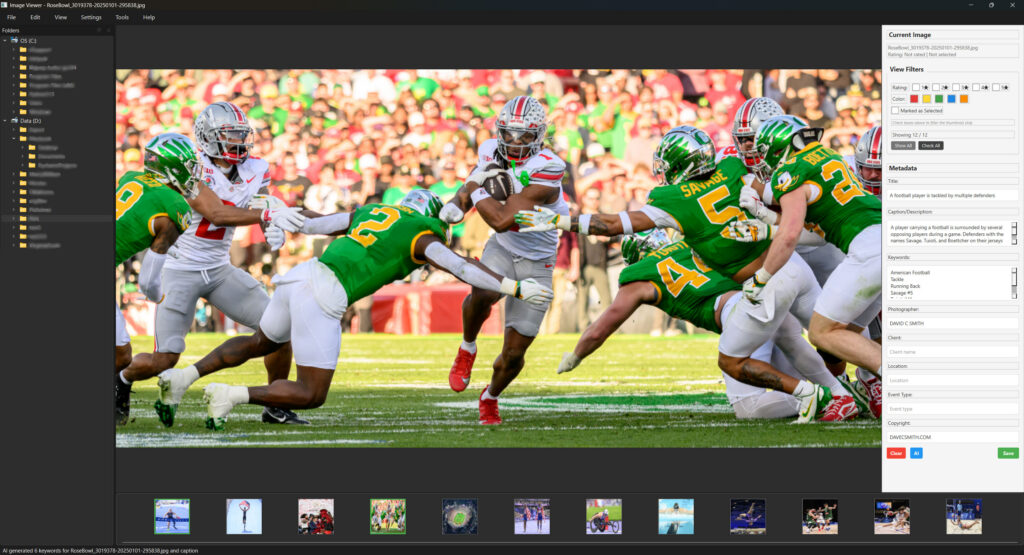
I wrote this tool to help me with the parts of being a photographer that can be slow and annoying. Mostly Culling and setting metadata titles and descriptions.
Please download and test the beta version, let me know if it meets your needs or what features you would really like to see.
This is a semi-mature beta version and supplied with no warranties or guarantees whatsoever.
For the moment it only runs locally and I receive no data about you or your usage of this program–unless you purchase a copy in which case during the purchase process I do receive basic information required for a secure purchase, though I would appreciate your feedback.
What can you do with this?

Who built this
I’m Dave Smith, a photographer (who also spent 20+ years working in tech). I wrote this tool to speed up the parts of my own work that are slow and annoying, mainly culling and writing titles and captions.
It’s in beta, and I read every message. Tell me what works for you and what you need next: contact me.
Questions before you buy
How much does it cost?
$24.99 a year for one computer. That includes every update released during your year. You buy from inside the app: Help > Purchase Registration.
What happens after the 45-day trial?
To keep using the app, buy a license from Help > Purchase Registration. The Microsoft Store version has a 30-day trial instead.
Can I get a refund?
Yes. If you buy and it’s not for you, email me within 30 days for a full refund. Use the contact page.
Does it run on Windows and Mac?
Yes: Windows, and Mac on both Apple silicon and Intel. You can download it here or get it from the Microsoft Store or Mac App Store. On Intel Macs the composition score, trained denoiser and Composition Training are not available, the Mac App Store version does not support Intel based Macs.
How do my picks get into Lightroom?
Ratings, titles, captions and keywords are saved to XMP sidecars next to your RAW files, and the RAW files themselves are never rewritten. Move your selects to a subfolder with File > Move to Folder, then import that folder into Lightroom, which reads the sidecars. Bridge, Photo Mechanic and Capture One read them too, and reject flags round-trip with Lightroom and Photo Mechanic.
Does any of my data leave my computer?
Not unless you choose to send it. The app runs locally and sends me no data about you or how you use it. Buying a license sends the basic details needed for a secure purchase. If you turn on AI auto-tagging, the photos you tag go to your AI provider using your own API key (roughly a penny per 10 photos). Use Ollama or manual tagging instead and tagging stays on your computer.
- Photo ingestion from cards or other sources,
- it automatically renames every file in a way that can virtually guarantee no duplication of file names: shootname_camSerial-YYYYMMDD-HHMMSSss.ext this is a bit long but makes for easy finding and sorting of files.
- Makes it easy to make sure when shooting with multiple cameras all files can be put in the same folder and still identifiable
- Uses multiple threads to make sure the ingest happens as fast as your drives will allow.
- Fast Culling
- Similar to photo mechanic (but in my testing faster) or other tools this tool allows you to very quickly review your RAW images, rate them and move the good ones to a sub folder for ingest into your actual editing tool.
- Assisted Culling
- You can analyze your photos for sharpness etc either one at a time or in bulk and it will show you what it thinks of each (note: at this point this is focused on humans, and I am not sure how it will do with animals or landsacpe)
- Metadata managment:
- Allows you to easily add things like Titles/Captions/keywords/copyright info either individually or in bulk
- Also can be integrated with Google’s Gemini to analyze and automatically Title/Caption/Keyword each photo — requires a gemini api key the cost is approximately a penny per 10 photos, but it depends on which gemini model you choose.